
Gameboy Advance, Modding, Troubleshooting
Gameboy Won’t Turn On? 5 Simple Troubleshooting Tips for the GBA

Dec
When Your Gameboy Won't Turn On: Troubleshooting Tips From a Pro
Table of Contents
First off … don’t panic if your Gameboy won’t turn on! 😅
Although Nintendo has ended their support for their GBA and GBA SP consoles, I’m here to help!
The GBA is a tough console. A lot of “dead” Gameboys that won’t turn on, just need a tiny bit of love to wake back up. Before you think about repairs or sending your console in, try these quick troubleshooting steps.
Check the Power Switch (sticky, stuck, or gummy)
If your gameboy won’t turn on and has been sitting for a while, the power switch can get sticky or slightly “glued” in place from dust, old grime, or humidity.
Try this:
Slide the power switch back and forth quickly about 20–30 times.
Don’t force it — just firm, quick motion.
Then try powering it on again.
A surprising number of consoles spring back to life after this. It helps clear out microscopic gunk and re-seats the internal contacts.
If the switch feels crunchy, VERY stiff, or doesn’t move smoothly at all, stop and initiate the repair process ASAP.
Are Your Battery Contacts & Terminals Clean — or Corroded?
Don’t forget to check the battery contacts and terminals, both on the console and on your rechargeable battery pack.
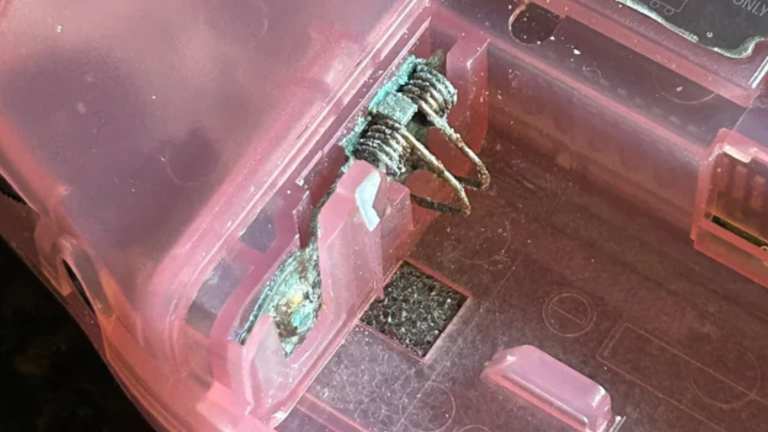
Those metal contacts should look clean and shiny, with firm spring tension. If you see rust, blue/green crust, white powder, or pitting, that’s corrosion — and it can completely stop power from flowing.
What clean battery contacts should look like:
✔ Bright silver or gold-toned metal
✔ Smooth surface
✔ Firm spring pressure
✔ Full contact with the battery terminals
What corroded battery contacts look like:
✖ Blue, green, or white crusty buildup
✖ Rust or dark brown/black metal
✖ Pitted or flaking contacts
✖ Weak or bent spring tension
If your contacts look like the “crusty” example in the photo, that corrosion can block power completely. The console isn’t “dead”… it just can’t get juice.
⚠️ If corrosion is severe, don’t scrape aggressively, that can damage the pads. It’s best to have it cleaned or repaired properly.
This is especially common on Game Boys that have been stored for years or had old AA batteries leak inside long before anyone noticed.
Make Sure Your Rechargeable Battery Is Seated Correctly
If you’re using a rechargeable battery pack (instead of AA batteries), it NEEDS to make solid contact with the battery terminals.
Open the battery door and check:
The metal battery terminals on the Game Boy
The metal terminals on the battery pack itself
They should be:
✔ touching fully
✔ not bent away
✔ not blocked by debris, foam, tape, etc
Sometimes a battery pack can shift slightly and lose contact, especially if the console was dropped or the door doesn’t fit tight.
Try this:
Remove the battery
Reseat it firmly
Close the door securely
Try powering on again
If there’s corrosion or rust, that will need a proper cleaning before power can flow correctly.
Does the Power LED Turn On At All?
🟢 LED turns on, but screen stays black/white/flickers
Good news! The console is getting power. The issue is likely screen, battery drain, or connection related.
🔴 LED never turns on
The console likely isn’t getting power at all. That usually means:
Dead battery
Bad battery contact
Internal power rail/power switch issue
Or physical damage
Make note of what it’s doing as this helps a ton if you later message me about repairs. 👍🏼
Think About the Console’s History
Ask yourself:
🕹 Has it been sitting unused for years?
Old contacts can dry out, batteries die, and switches get sticky. Totally normal.
💥 Was it ever dropped, crushed, or exposed to moisture?
Even minor accidents can loosen internal connections.
🔌 Was anything recently replaced or modded?
Sometimes something just needs reseated, especially screens or batteries.
The more info you have, the easier it is to diagnose.
When to Reach Out for Repair
If you’ve tried the steps above and it still won’t wake up, don’t worry, it doesn’t mean your console is done for. 😎
Send me an email if:
The LED never turns on
The power switch feels damaged or broken
The console only turns on sometimes
The battery contacts look corroded
Or you just don’t want to mess with it 🙂
I’ll always do my best to point you in the right direction, whether that’s home troubleshooting or sending it in for a professional repair.
FAQ Section
Why does my Gameboy only turn on sometimes?
That’s almost always a loose connection or dirty power switch. The internal contacts may not be making full contact every time. Cycling the switch a few times or reseating the battery can sometimes fix it.
Can a sticky or gummy power switch stop the GBA from turning on?
Yep — totally. Over time, dust and grime build up and the switch contacts don’t engage properly. Moving the switch back and forth quickly (without forcing it) can help clean the internal contact area enough to boot.
Do rechargeable GBA batteries go bad over time?
For sure. Rechargeable batteries slowly lose capacity, particularly if the console’s been sitting for years. If your Gameboy won’t power on unless it’s plugged in, or dies quickly, the battery probably needs replacing.
What should the battery contacts look like?
They should be:
✔ shiny metal
✔ firmly spring-loaded
✔ not bent or corroded
If you see rust, white crust, or green residue, that corrosion needs to be cleaned properly — otherwise the console won’t get power.
Can dropping my Gameboy cause it not to power on?
Yes!! A drop can loosen connections, shift the battery, or damage the power switch. If it stopped working right after an impact, that’s a big clue.
My Gameboy has been sitting in storage for years. Is that a problem?
Totally normal, but long storage can cause:
• sticky switches
• dead rechargeable batteries
• oxidation on contacts
Most of the time it’s fixable with basic troubleshooting or a simple repair.
Is it safe to open my Gameboy and try to fix it myself?
If you know what you’re doing and have the right tools … maybe. But if you’re unsure, it’s always safer to let a tech handle it. You don’t want to damage the board or tear a ribbon cable.
When should I stop troubleshooting and send it in for repair?
Reach out if:
• the LED never turns on
• the battery contacts are corroded
• the switch feels stiff or broken
• nothing changes after basic troubleshooting
• or you just don’t want to risk opening it
I’ll point you in the right direction — even if it’s out of warranty.
Which model of GBA does this troubleshooting guide apply to?
These steps are great for:
• Gameboy Advance (GBA)
• Gameboy Advance SP
• Original Gameboy / Color (with tweaks)
Final Note
These guides exist because I genuinely want you gaming happily, warranty or not.
The GBA and GBA SP are the GOAT handhelds, and keeping these legends alive is kinda my thing ❤️
If you ever feel unsure, snap a picture or describe what’s happening and I’ll help however I can!