Gameboy Advance, Emulation, Modding, Retro Gaming
7 Powerful Reasons to Supercharge Your Gameboy Advance with the Overclock Module

Dec
Supercharge Your GBA: Unlock Faster and Slower Gameplay On Demand With Overclocking
Table of Contents
Remember when games made you grind for hours just to level up your Pokémon?
Back in the day, there were no shortcuts … just battles, XP, and patience.
But flash forward to 2025, there’s a way to speed things up (or even slow them down) with a simple hardware upgrade: the Gameboy Advance Overclock Module.
This little powerhouse lets you control the speed of your GBA, perfect for players who want smoother, faster gameplay or slower precision for tough sections.
Whether you’re replaying Pokémon FireRed, Metroid Fusion, or Castlevania: Aria of Sorrow, this mod adds a next-gen quality-of-life upgrade to your GBA and gameplay!
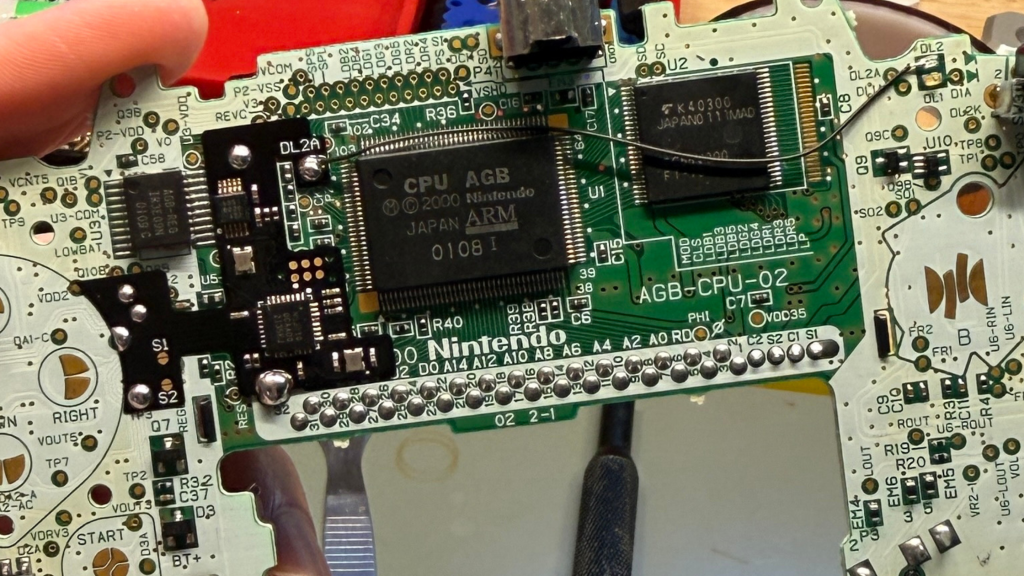
What Is The Gameboy Advance Overclock Module?
The Overclock Module from @robot_retro is a performance mod that changes the clock speed of your Game Boy Advance (GBA). That means you can play up to 170% faster or down to 30% slower, and all on demand.
Here’s what it does:
🔹 Overclock: Speed up gameplay to blast through slow or repetitive sections like Pokémon grinding or RPG farming.
🔹 Underclock: Slow things down for tighter control in platformers or to enjoy every nostalgic pixel in chill mode.
🔹 LED Indicator (optional): See your mode in real time: solid green for normal, faster blink for overclock, slower blink for underclock.
🔹 Low power draw: Minimal battery impact (<15 mA), so your sessions last with minimal impact on battery life.
It’s like giving your Gameboy Advance a turbo button straight from the future.
Why Overclocking Changes The Game
1. Skip the Grind, Keep the Fun
Classic Pokémon games are legendary, but they can also feel slow. The Overclock Module lets you speed through training battles, wild encounters, and long travel routes while keeping the authentic experience intact.
No emulators. No cheats. Just real original hardware, running faster.
2. Perfect for Long RPGs
Games like Golden Sun, Final Fantasy Tactics Advance, and Fire Emblem are incredible but heavy on dialogue and animations. By bumping up the speed, you get to the action faster without losing the charm.
3. Slow It Down When Precision Matters
Underclocking gives you an edge in timing-based games like Mega Man Zero or Metroid Fusion. Slower gameplay means more control, especially when practicing speedrun segments or tricky jumps.
4. Preserve the Retro Vibe
This mod doesn’t alter the cartridge or ROM. It’s all hardware-based. You’re still playing the game as it was meant to be played, just enhanced with modern tech that gives you flexibility.

Gameboy Advance Overclock Module: A Quick Tech Breakdown
Inside every GBA is a clock crystal that sets the system’s speed (4.194 MHz). The Overclock Module swaps or reroutes that crystal to adjust timing signals, letting you modify speed dynamically.
Typical ranges supported:
🐢 30% / 50% / 75% — Underclock (slow)
⚡ 130% / 150% / 170% — Overclock (fast)
Base speed = normal 100%.
Installation is best done by experienced modders, since it involves soldering and potentially linking to an LED indicator. Once installed, toggling between modes is simple, and you’ll feel the difference instantly.
FAQ Section
What does an Overclocking Module do on a Gameboy Advance?
An Overclock Module lets you speed up or slow down gameplay on a Gameboy Advance by adjusting the system’s clock speed. This helps reduce grinding in games like Pokémon and improves control in platformers that need precise timing.
Is the Gameboy Advance Overclock Module safe?
Yes. When installed correctly, overclocking is safe for the Game Boy Advance hardware. It modifies clock speed, not voltage, and does not harm cartridges or save data. It also has minimal impact on battery life.
Does the Gameboy Advance Overclock Module work with IPS screen mods?
Most IPS screen kits (V2) work perfectly with overclocking. Extremely high-speed modes may cause minor screen sync issues on certain kits, but normal and turbo settings run smoothly on most builds.
Laminated IPS v5 screens ARE NOT currently supported.
Why is overclocking useful for Pokémon games?
Pokémon games on GBA and earlier systems can be slow, especially during grinding, leveling, and random encounters. Overclocking cuts grind time significantly, letting you level up faster while still playing on real hardware, not emulators.
Can I switch between slow, normal, and turbo modes anytime?
Yes. You can toggle between 30–75% (slow), 100% (normal), and 130–170% (turbo) instantly.
No menus, no ROM hacks, just hardware-level control.
Will overclocking help with speedrunning?
Yes. Speedrunners use underclocking for tight control and overclocking for fast XP or resource grinding. It’s a quality-of-life mod for both casual and competitive players.
Does underclocking have benefits too?
Definitely. Slowing down gameplay helps with platformers, precision jumps, boss fights, and practicing difficult sections. It gives you more control without altering the game itself.
Final Word: Why Add It To Your GBA Build?
Adding the Gameboy Advance Overclock Module makes your GBA truly one-of-a-kind:
Increases collector value because it’s not just cosmetic; it’s functional performance.
Appeals to Pokémon fans, RPG players, and completionists.
Enhances your GBA mod’s feature set, especially when paired with IPS V2 backlit screens, USB-C batteries, or Power Cleaner upgrades.
It’s not just a mod. It’s a power-up.
Where To Get It
You can get the Overclock Module pre-installed on your next GBA build or added to your existing console as an upgrade.
👉 Shop the Overclock Module & Custom Game Boy Advance Builds
👉 Follow @GamerGirlGameboyMods on Instagram for mod showcases, behind-the-scenes reels, and monthly collector drops.
👉 Already have a GBA? Get it added to yours now and unlock all the power of the overclocking module on your very own Gameboy Advance?
Get The Free GBA Build Guide