Modding, Gameboy Advance
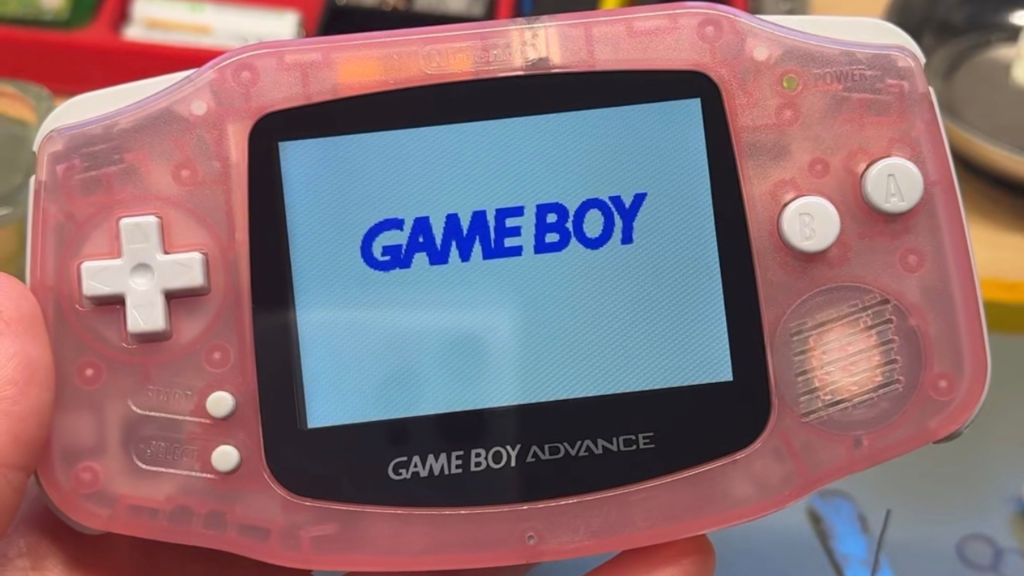
GBA IPS Screen Upgrade: Laminated vs Non-Laminated Explained
Mar
GBA IPS Screen Upgrade: There Are Only Two Types. Here's What They Mean.
Table of Contents
The number one question I get about Game Boy Advance builds?
“Is this backlit?”
And honestly? It’s the right question to ask.
Because the original Game Boy Advance had no backlight. None. You needed direct sunlight or a lamp pointed at the screen just to see what was happening.
Nintendo partially corrected this with the Game Boy Advance SP in 2003, but the original GBA? Left in the dark.
That’s exactly where the IPS screen upgrade comes in.
And if you’ve ever tried to research GBA IPS screens before, you’ve probably run into a wall of confusing version numbers, brand names, and spec comparisons that made everything feel more complicated than it needs to be.
Here’s the truth: there are only two types of IPS screens for the Game Boy Advance.
Once you understand the difference between each GBA IPS screen upgrade available, everything else falls into place.
The Original GBA Screen Problem
The Game Boy Advance launched in 2001 with a reflective TFT screen. It was designed to be played in bright light, which sounds fine in theory.
In practice? It was genuinely difficult to see indoors, at night, or really anywhere that wasn’t direct sunlight.
This wasn’t a defect. It was a design limitation of its time.
But in 2026, we can do better. A lot better.
What is a GBA IPS Screen Upgrade?
IPS stands for In-Plane Switching. Without going too deep into the technical side, IPS screens offer:
- Bright, vivid backlighting
- Better color accuracy
- Wider viewing angles
- Sharper image quality
Installing an IPS screen into a Game Boy Advance transforms the visual experience entirely. The same games you’ve always loved look noticeably cleaner, brighter, and more vibrant.
It’s not about changing what the GBA is. It’s about letting you actually see it clearly.
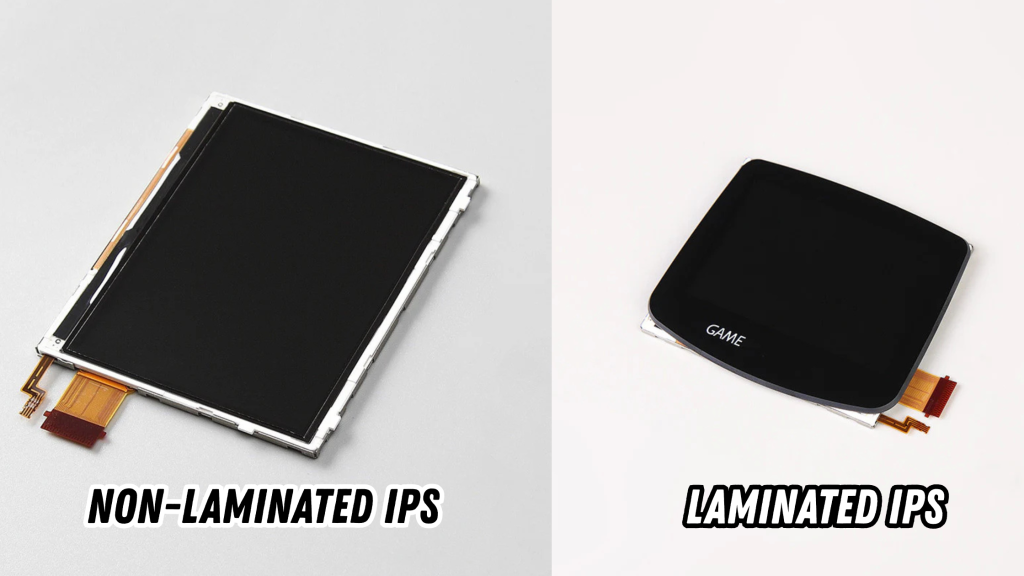
Laminated vs Non-Laminated: The Only Distinction That Matters
This is where most people get confused. And it really doesn’t need to be complicated.
There are two types of IPS screens for the GBA. That’s it. Just two.
Laminated screens: The glass lens and the display are bonded together as one single piece. There is no gap between them.
Non-laminated screens: The glass lens and the display are two separate pieces. There is a small gap between them.
That’s the whole distinction.
Everything else: version numbers, feature sets, brightness levels, pixel modes. These are upgrades within those two categories. They don’t create new types of screens. They just represent improvements over previous versions of each type.
When someone says “IPS V2” or “IPS V3,” they’re describing a version of one of those two screen types. Not a third category.
It really is that simple. And now you know more about GBA IPS screens than most people who’ve been modding for years.
Versions and Brands: What They Actually Mean
Once you understand that all GBA IPS screens are either laminated or non-laminated, version numbers and brand names start to make a lot more sense.
The two most well-known brands in the GBA modding community are FunnyPlaying and Hispeedido. Both produce quality screens. Both offer options in the laminated and non-laminated categories. Where they differ is in their specific feature sets, things like:
- Available color modes
- Pixel Display Options
- Brightness adjustment levels
- Additional display customizations features
These features are worth comparing when you’re choosing a specific screen. But they don’t change the fundamental choice.
Start with laminated or non-laminated. Then compare features.
What the Installation Actually Involves
Installing a GBA IPS screen isn’t plug-and-play. It involves opening the console, careful disassembly, and proper fitting of the new screen. Some installations also require shell trimming depending on the screen type and shell you’re working with.
Non-laminated and laminated screens also have different shell compatibility requirements. Laminated screens are newer technology and compatible shell options are still expanding, which is worth factoring into your build planning.
For most people, there are two clear paths forward:
Have it done for you: Order a custom GBA build with the IPS screen installed, tested, and ready to play from day one.
Do it yourself: Learn the process properly, step by step, so you can mod your own console with confidence and come out knowing exactly what you did and why. (Check out my DIY Modding Course, so you can install an IPS screen yourself!)
FAQ Section
What is a GBA IPS screen upgrade?
A GBA IPS screen upgrade replaces the original dim, unlit display in a Game Boy Advance with a modern IPS backlit screen. The result is a significantly brighter, sharper, and more colorful display that makes the entire GBA library far easier and more enjoyable to play — indoors, at night, anywhere.
What is the difference between laminated and non-laminated GBA IPS screens?
A laminated IPS screen bonds the glass lens and the display into one single piece, eliminating any gap between them. A non-laminated IPS screen keeps the glass and display as two separate pieces with a small gap between them. This is the only fundamental distinction between GBA IPS screen types. Version numbers and brand differences represent feature variations within these two categories — not separate screen types.
Can dust get under a GBA IPS screen?
Dust under the lens is a possibility with non-laminated screens, since there is a small gap between the glass and the display. Laminated screens eliminate this risk entirely because the glass and display are bonded together as one piece. For non-laminated screen owners, cleaning dust from under the lens is a manageable process that can be done at home without professional tools.
What are the best GBA IPS screen brands?
FunnyPlaying and Hispeedido are the two most recognized brands in the GBA modding community. Both produce quality IPS screens across laminated and non-laminated options. The right brand for your build depends on the specific features you’re looking for — color modes, brightness levels, pixel display options, and similar preferences.
Do I need a special shell for a GBA IPS screen?
Screen type affects shell compatibility. Laminated and non-laminated screens have different fitment requirements, and some installations require shell trimming. Laminated screens are a newer technology with shell compatibility options still expanding. Choosing the right shell for your screen type is an important part of the build planning process.
Can I install a GBA IPS screen myself?
Yes — with the right guidance. IPS screen installation involves opening the console, careful disassembly, and proper fitting, but it’s absolutely a skill that can be learned. My course, How To Mod A Game Boy Advance Like a Pro, walks you through every step of the process from start to finish — including IPS screen installation, troubleshooting, and basic soldering — so you come out confident in what you built.
Does an IPS screen change how GBA games play?
No. An IPS screen upgrade only affects how games look, not how they play. The games, controls, cartridge compatibility, and overall feel of the console remain exactly the same — just with a display that finally does the hardware justice.
Final Word: The Screen Your GBA Always Deserved
The original Game Boy Advance was excellent hardware with one glaring weakness: a screen that demanded perfect lighting conditions just to be usable.
That’s not a flaw you have to live with anymore.
A GBA IPS screen upgrade doesn’t change what your GBA is. It just lets you see it clearly. The way it always should have been.
Whether you go laminated or non-laminated, the result is the same: a Game Boy Advance that’s brighter, sharper, and far more enjoyable to play than anything Nintendo shipped in 2001.
That’s the upgrade. And it’s worth it every time.
Ready To Learn And Install One Yourself?
My course, How To Mod A Game Boy Advance Like a Pro, walks you through the complete IPS screen installation from start to finish, including setup, fitment, troubleshooting, and everything in between!